You have likely heard the old Russian proverb: “доверяй, но проверяй.” It means “trust, but verify,” and it used to be a standard within the InfoSec community for decades. Slowly, many organizations have moved their infrastructure toward a Zero Trust Architecture, which has helped improve security postures further. But even still, unearned and unverified trust is rampant. For example, as a user of apps and devices, how much do you trust that the apps you use are secure?
That question came up for the Black Hat Network Operations Center (NOC) team at Black Hat USA 2026, long before the event had even begun. The NOC brings together teams from Arista Networks, Cisco, Corelight, Jamf, Lumen, and Palo Alto Networks to monitor and protect the conference network. During the NOC setup, NOC staff identified two devices on the network that were transferring photos to an FTP server completely in the clear. The photos were of children participating in a futsal tournament. There were pictures of teams playing matches, headshots, and candid photos of participants and family members.
With the help of Corelight logs that are powered by Zeek®, we were able to identify the photographer’s identity (first from all the metadata on the photos and second from the metadata within the Corelight logs) and then locate him in the conference center. When we shared what we had found and what we could see on the network, he said that he had no idea that his photo album app was sharing data completely in the clear. We advised him to cease using that app, but the damage had already been done.
Over the course of the futsal tournament, his two devices had already leaked 101 photos. Anyone using Wireshark in promiscuous mode and a fast enough storage device would have been able to pluck every one of his photos in the clear. So, the question remains: How many apps on your personal devices do you trust to share your PII or company data? And have you truthfully verified that those apps actually secure the data they transmit?
Well, if you are like most everyone on planet Earth, you likely live by the dangerous mantra, “Trust every app because I don’t have enough time, knowledge, money, or care to verify.” Let’s take a dive into the dangers of that mindset through some real-life scenarios from Black Hat and talk about ways that we can all do a little more verifying.
Take a SIP of privacy
Almost all of our employers make use of VoIP services at work. Additionally, privacy advocates may regularly spin up new VoIP numbers to share when needed. So you would naturally expect that these types of phone apps would implement some sort of encryption on top of SIP calls, but unfortunately this is often not the case.
At Black Hat, our Corelight sensors identified and logged several SIP phone calls. Most were made over port 5061, which is the default encrypted SIP port. However, we also spotted a concerning number of calls being made over 5060 and 5070 from a few Black Hat attendees. Typically, these numbers would be fine if we were talking about modern GPU options, but they would be extremely insecure and outdated if we were referring to SIP port numbers. The calls that were made over these ports were unencrypted, which would allow anyone else on an open network to listen to or save the conversations.
However, a real threat for this attendee was that the owner of the network could eavesdrop on any of their calls at any time by positioning themselves on the network path (think nation states and ISPs). Below is an audio-wave image of one of these conversations taken directly from Wireshark, no additional tools needed:
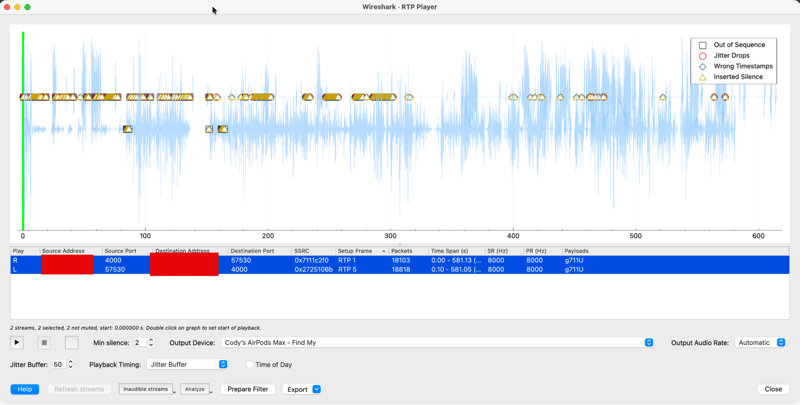
The image above is of a nine-minute phone call between a Black Hat attendee and a local credit union. During the call, both parties shared all of the PII necessary to identify the attendee with the financial institution: first and last name, address, phone number, last four digits of the attendee’s SSN, bank account information, and more. The discussion focused around a recent small business loan and its purpose.
Upon further investigation, our NOC team learned that the app being used by the attendee was one that has been downloaded over 10 million times worldwide. Given its broad use, you would expect that this application would encrypt its data, but that type of expectation is what can land you in “trust-blindly-and-forget-verifying” territory. Four devices on the conference network made connections using this app, eight calls in total, and every one of them was in the clear.
Feel free to walk away with my data
Another egregious abuse of trust was discovered within a simple exercise app. The idea behind the program is that, as you walk, you accumulate “steps,” which can be converted into in-app tokens redeemable for rewards. However, the app communicates with the server over HTTP:80 to track your steps. That means that your steps are being logged in the clear. On its own, this is not a big problem, except the app was not just sending our attendees’ step counts in the clear:
As you can see above, we had to redact the users’ unique IDs, nicknames (which were actually full legal names), countries of origin, in-app friend codes, email addresses, genders, phone numbers, weights, heights, home timezones, and more! What a wonderful treasure trove of PII available to all interested parties. I trust that the 23,000 hackers at an InfoSec conference were not meant to be included in the “We share this information only with our trusted third-party partners” line of the app’s privacy policy. But here I go with my “trust issues” again…
Watch together
Some video streaming platforms give their primary users the ability to invite other users to watch a movie or video stream together live. It provides a way to interact socially while far apart. The apps discussed below do not have such a feature, but they provide the same function, since their video streams occurred in the clear.
First, we discovered a video feed from a streaming app that a conference attendee was using to keep an eye on the family dog. The app required to watch this feed transmitted its content in the clear. Funny that a “security” camera had zero security baked into its app.
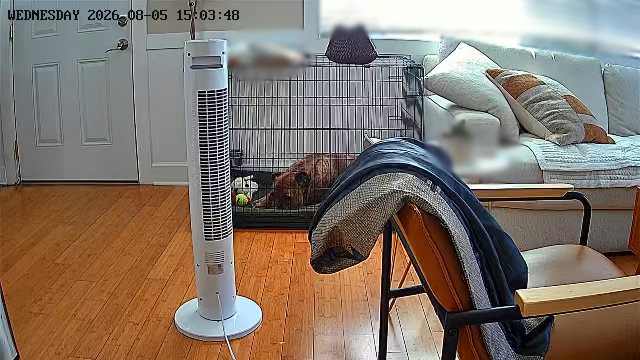
Then we came across a second streaming app that showed a child and a caregiver at home in their living room. The video stream came from a video camera company that has sold over one million cameras, and whose app has hundreds of thousands of downloads across all major app stores. For the sake of the family’s privacy, images from that camera are not shared in this blog post.
In the two preceding cases, it appeared that the official user apps were unable to be configured to encrypt their video streams. In such cases, the only way to prevent the risk is to discontinue use of the camera and the app. There were, however, cases where the user was legitimately at fault.
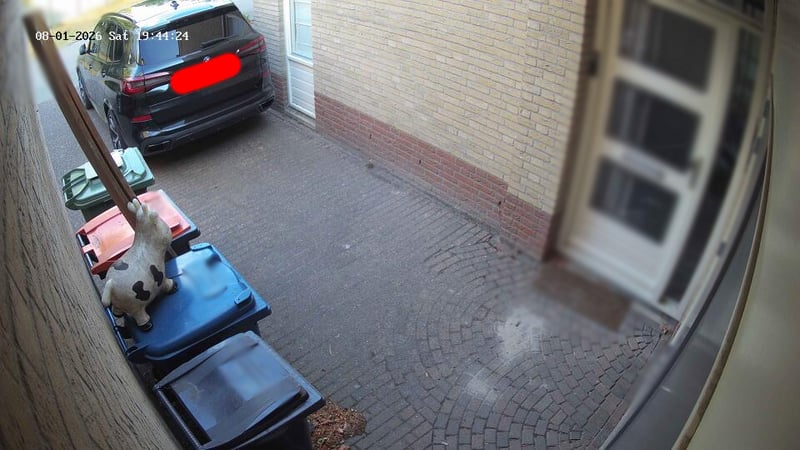
Next, we saw a video camera streaming what appeared to be an alleyway leading to a Black Hat attendee’s home pictured below. This video was being broadcast in the clear from a Home Assistant setup to a video streaming app. We determined that the user failed to place the stream behind HTTPS when they set up the self-hosted solution, meaning that the stream and the credentials required to access it were unencrypted.
Our last example of streaming in the clear stemmed from a SBC connected to a 3D printer. When setting up a custom 3D printer video stream, users are required to provide their own endpoint for the video feed. When doing so, they need to make sure that their endpoint uses an HTTPS connection, and it is very important to not forget the “S” when typing in the URL. Additionally, there is a host of solutions to make sure that homelabs do not stream content in the clear, and they should be inaccessible to someone who has hosted access to their network via a custom proxy and domain.
Yet, at the conference, we were able to see a live video stream of an attendee’s 3D printer. This person had made use of a proxy to route a live video feed from a Raspberry Pi to an Android app. The device was not configured to use HTTPS, so the credentials to the printer’s control center were shared in the clear. And it appeared that the last print didn’t go too well, as evidenced by the random filament blobs.

From these examples, it is clear that it does not take a lot of imagination to conceive how the video streams and the devices that transmit them could be used for malicious purposes. Off-the-shelf video cameras almost always run on unpatched, vulnerable firmware. SBCs with stock Linux images used to manage homelab devices are often left with default usernames and passwords. When novices to the field set up their infrastructure, they sometimes follow a tutorial article or video; and if that training resource shares an insecure practice, the user is likely to repeat that same mistake. Regardless of how the vulnerability enters the network path, it is rarely spotted, especially if the end product works (e.g., if the video streams as intended).
And it never ends
As if this short list were not egregious enough, we had several other apps leaking PII and other sensitive information:
- A stock-trading app connected to servers that held IP addresses belonging to a previously acquired company and had certificates that expired years ago. This caused the app to fall back to cleartext traffic and leak the stocks that the user both owned and was following in a ticker format.
- An attendee logged into a custom app that did not enforce encryption, leaking his name, username, and password.
- An anti-addiction app leaked its user data, such as usernames and persistent tokens over cleartext.
- An MDM agent on multiple devices sent tokens and device-command endpoints in the clear.
We also found several other leaks of varying degrees of PII in the clear, too numerous to be mentioned here. None of these findings involved malware, exploits, or adversaries of any kind. Every one of them was a legitimate app or feature that was either doing exactly what it was designed to do or what it was accidentally allowed to do. Sometimes, it was a code choice the app designers explicitly made. Sometimes, it was some code that the developers were unaware of. There were also some cases of it being a mistake on the part of the user.
So how can you spot the leaks of your own private data? And what change do you have of preventing leaked data from causing a legal nightmare?
Only you can prevent PII fires
We often think of threat hunting as a way of finding malicious actors. We set up alerts, IOC detections, and honeypots aimed at identifying threats and unauthorized activity in our networks. But these same skills can be used for much more than just spotting adversaries. In fact, one of the best ways to spot bad code or configurations is by leveraging that threat-hunting skillset. Security audits, vendor statements, spec sheets, and promises only go so far. Watching live traffic in a real environment is the only way to see if your devices are leaking data that may come back to bite you.
If you work at an organization that processes user data (hint: that is every organization), then you should be able to describe how your services process data in transit. Most assuredly, you have set up your endpoints to only accept incoming connections via encrypted ports, but do the apps try HTTP when they first connect? Do they have a fallback to cleartext protocols? Are your certs expired? And if any of those things are true, what are the consequences? All too often, apps and back-end services allow for data transmission in the clear. And if there is no negative impact on performance, these data leaks can go unnoticed.
For organizations that have the resources to support Network Detection and Response (NDR) solutions, Corelight can provide increased visibility into your network traffic, enabling you to confidently say how applications interact on your networks.
Проверяй
Verify. Whether you are a security analyst, a software engineer, or a user (hint again: that is everyone), you should take care to ensure that your most critical assets (i.e., your data) are kept secure. Far too frequently, we just assume that the makers of our software have put security measures in place. Sometimes vendors investigate how their apps function, but those tests are almost always done in environments that are ideal: the Wi-Fi signal is not spotty, there are not 80 other devices on the same residential WAP, all the software is patched to the latest version, and so on.
So it is up to the everyday user and the everyday analyst to make sure that your wedding photos; your profile photo, height, weight, and phone number; your live video streams; and the passwords to your accounts and personal devices are not being sent in the clear. So start with something small today. Don’t trust. Verify.
Did you like this blog? Check out our other Black Hat posts for more play-by-play findings. I also recommend downloading our Threat Hunting Guide to verify the security of the connections within your environment.