







When I got back from Black Hat USA, I was stunned. Of course, it’s easy to be overwhelmed by Black Hat. There is so much going on. Las Vegas casinos are loud and flashy. Going outdoors feels like standing on the surface of the sun. Everywhere you walk there are strong smells, and you hope it’s a delicious meal, but sometimes it’s not. Then, once you layer Black Hat on top of it—the crowded show floor, one hundred friends you haven’t seen since the last conference stopping you in the halls to say hello, and the sound of thousands of voices all speaking simultaneously—it’s a lot to take in.
For my team there is the additional layer of excitement of being in the Network Operations Center (NOC). Inside the NOC there is energetic electronic music, low lights, and blue light from dozens of screens full of alerts, logs, and dashboards, and a fast-paced investigation around every turn. When you add it all up, it’s enough to cause delirium.
Every show, I worry that maybe we won’t see something interesting. Every time, I am surprised. “Did we really just see that?” Yes, yes we did. Below, I’ll walk you through just a few of the things we investigated in the Black Hat NOC alongside our partners Arista, Cisco, Palo Alto Networks, Jamf, and Lumen.
These investigations fall into a few main categories, namely: enterprises making mistakes, apps or app developers making mistakes, and people making mistakes with AI. Are you noticing a theme? 😉 Great news: you actually get two themes! Theme number one is “mistakes” (obviously), and theme number two is “music Mark remembers from the radio in the ‘90s and 2000s.” Let’s go!
Oops, I did it again
Yes, that is a Britney Spears reference. It’s the first thing that popped into my head when we discovered two mistakes—both involving sensitive information passing in the clear—while monitoring the network traffic of the Black Hat conference.
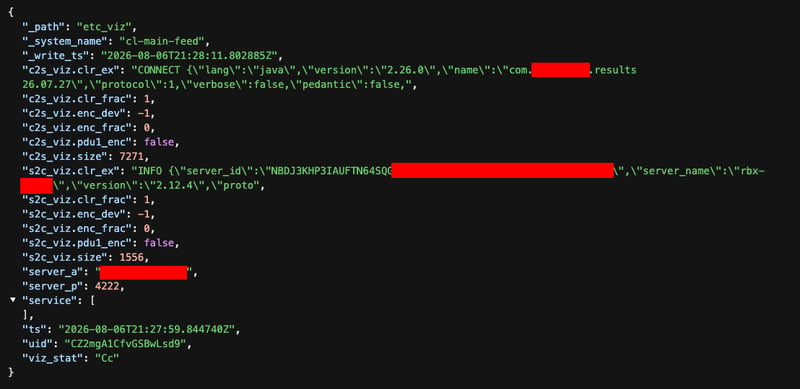
We noticed the first mistake when we spotted some unusual-looking text in the etc_viz log, which is a log generated by one of the packages in the Corelight Encrypted Traffic Collection available to Corelight customers. The package can point out traffic that is encrypted in non-standard ways which represent some of the things that adversaries do when securing their command and control channels, such as using a pre-shared key for instant end-to-end encryption which can’t be intercepted by standard TLS decryption capabilities of modern next-generation firewalls.
However, one of the other things that the Encryption Detection package can do is analyze characteristics of a connection over time to see whether it “looks encrypted” and point out variations, such as when a connection drops to something that resembles plaintext mid-connection, which can often indicate that there is plaintext in the middle of a custom binary protocol. The package helpfully drops excerpts of the plaintext right in the etc_viz log. You might remember that we used this capability to detect cleartext video game traffic at Black Hat Asia this year.
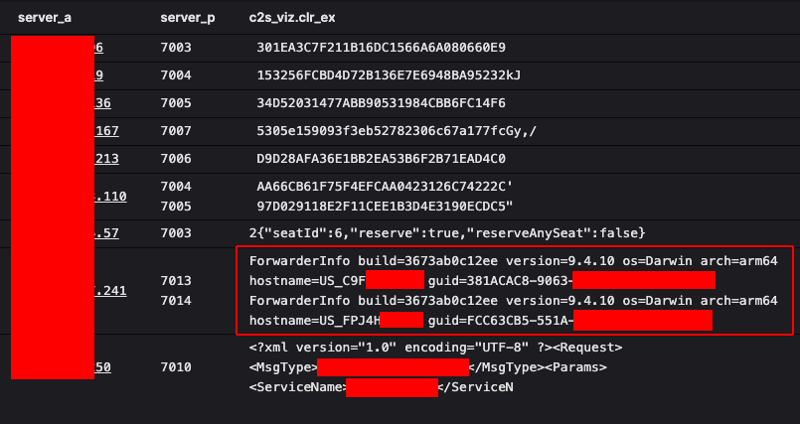
When we looked into the etc_viz log, one of the things that we noticed was some plaintext involving hostnames and GUIDs pointed at a relatively high port, from two different hosts at the conference.


When we inspected the packet captures, it was clear that there was a lot of potentially sensitive information in the network traffic that was coming from a particular conference attendee:
- Employee full name and account identifier
- Home-directory paths, UID/GID, login shell, and user UUID
- Device hostnames, hardware serial numbers, battery serial numbers, and Splunk forwarder GUIDs
- Internal and VPN IP addresses, MAC addresses, network interfaces, and Wi-Fi context
- Corporate email address and internal DNS/service names
- User login history and timestamps
- Installed applications and browser extensions
- Browser profile paths, extension identifiers, versions, and permissions
- Running services, listening ports, launch agents, and filesystem activity
- Operating-system, Splunk, and security-product versions
- Endpoint security health, licensing, tamper-protection, and disk-encryption status
- File paths, hashes, crash reports, and internal configuration details
From the context, it was pretty clear that this attendee’s organization was collecting endpoint telemetry into a centralized system for storage and analysis, which is a sound security practice. To accomplish this, they installed a Splunk Forwarder (Heavy or Universal) directly onto the endpoints, with a configuration that reads logs from the endpoint and forwards them, presumably to a centralized Splunk instance. While Splunk supports encryption for this traffic, it was clear in our findings that the organization didn’t enable it, which we assumed was unintentional. Oops!
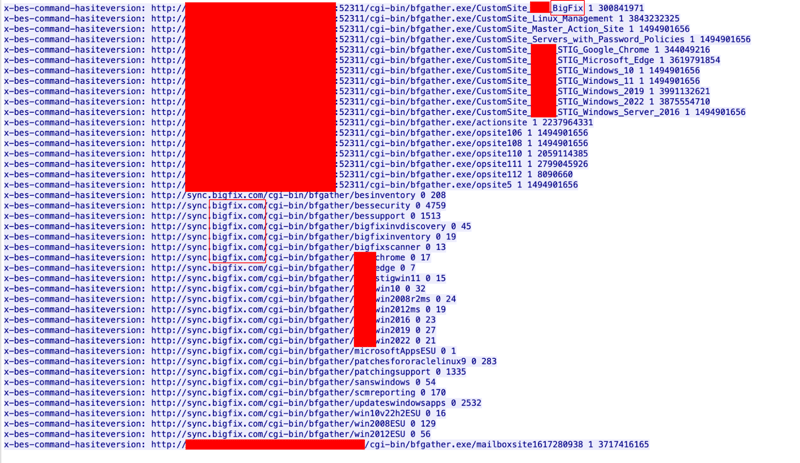
In a similar vein, we noticed a second mistake of sensitive information in the clear, but this time from a different attendee whose organization was using BigFix, an endpoint management solution. Their instance was accidentally reporting sensitive information back to a central server.

Like many solutions, BigFix can be deployed and self-hosted on-premises, which requires the customer to be responsible for configuring encryption and authentication for the management traffic. In this case, it seemed the customer didn’t do that, and instead the control channel was left in the clear, so eavesdroppers on the same network could sniff the network traffic to infer things about the configuration of the endpoints, what software (including security software) was installed, etc.
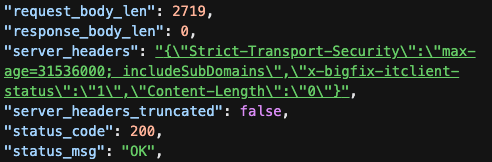
One interesting side note for this BigFix client: the server sent a Strict-Transport-Security header, which generally indicates that the domain is requesting that any clients refuse to connect via HTTP and to only connect to the domain via HTTPS in the future, which this client clearly did not respect.

Also, while the server sent the Strict-Transport-Security header, it didn’t redirect the client to HTTPS, which is typical for servers trying to encourage a client to use HTTPS; you can see that from the 200 OK status code and message. However, server redirects aren’t a silver bullet, as typically by the time the server offers a 3xx redirect, the client has already offered up all of its cookies/headers, payload body, and the URI, each of which can contain sensitive information such as authentication or session information.
In both cases, the cause and consequences were the same: because the organization self-hosted a solution, and configured it without explicitly demanding an encrypted communication channel, they were unintentionally exposing potentially sensitive network traffic to eavesdropping whenever a mobile client roamed to an uncontrolled network.
So, what are the takeaways?
- Ask yourself what mistakes any of your administrators (past or present) may have made in configuring encryption for the control channels of software used in your environment.
- Capture some network traffic to look for signs of unencrypted communications, and don’t just look for “in the clear” protocols like HTTP. Also pay attention to the possibility that other, custom binary protocols may also include cleartext information embedded in the traffic stream.
- For connections to central consoles, consider placing them behind a VPN or ZTN (zero trust network access) so that clients cannot connect over the open internet.
Are you “appy” now?
Yes, that is a Michelle Branch reference. As we continued our monitoring of the Black Hat network, we also noticed two other missteps related to applications / “apps.” The reason I highlight these separately is because they typically come from somewhere or someone else, and it’s not always apparent what goes on under the hood, but you know you get what you want from the application, so you don’t give it a second thought.
Or, maybe you’re the developer, and your application works and nobody is waving a red banner in your face telling you something is wrong, so you think everything is working fine. But it’s not always working in the most secure and private way possible, and the only way to know is to look.
First, our NOC team noticed an Android application which presented a user with live scores and betting odds from sports matches. Everything seems to be in order there. Working well.
… Except that the application was also submitting telemetry about advertisements that were being displayed to the user and some of the user’s actions to a NATS pub-sub server in the clear.

Here’s an example of one of the messages excerpted from the pub-sub stream:
{
"event_timestamp": 1785685840810000,
"value": 0.00127,
"provider": "google",
"event_date": "20260802",
"selection_id": "[REDACTED]",
"event_name": "ads_value_custom",
"currency": "USD",
"position": "/21866864457/Mobile-Smart-Banner_[REDACTED]",
"type": "banner",
"user_id": "[REDACTED]",
"device_advertising_id": "[REDACTED]",
"platform": "ANDROID",
"device_category": "mobile",
"device_mobile_brand_name": "OPPO",
"device_mobile_model_name": "CPH2791",
"device_operating_system_version": "16",
"device_language": "es-mx",
"geo_continent": "NA",
"geo_country": "MX",
"geo_region": "MX-CMX",
"geo_city": "ciudad de méxico",
"app_info_version": "26.07.20",
"app_language": "es-la",
"dispatch_timestamp": 1785685840811000,
"device_low_ram": 0
},
The stream of traffic included bids and placement of advertisements, including the monetization offered and the final winning bid. It also did the same for sports betting odds which were shown to the user. I sincerely doubt that the application provider intended for this traffic to be cleartext and observable by others on the network path, but alas it clearly was.
Later, our NOC team discovered another application that also showed up with a partially coded, partially cleartext stream in the etc_viz logs, which warranted a deeper dive.

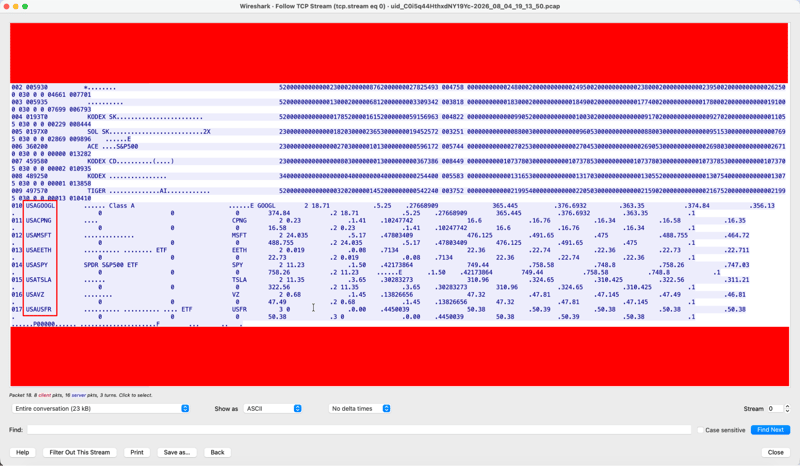
Pulling a packet capture from our Smart PCAP store, we were able to dig deeper into the larger context of the session. Zooming out helped, as we started to notice patterns of familiar 2- to 5-letter sequences, like SPY, GOOGL, VZ, MSFT, which are stock ticker symbols.

After digging deeper into the traffic, it appeared that it was a stock ticker and trading application, likely one for a computer (not mobile device), and there was a lot of information about the stock activity in the network stream.
Also, interestingly, the network traffic stream also included an X.509 certificate in the byte stream, which indicated that there might be some sort of authentication happening. However, after extracting the certificate and decoding it, it was apparent that the certificate had not been valid for over 15 years.

I was left with questions: if there was an X.509 certificate, why wasn’t TLS encryption being used? Why had the certificate not been rotated? Why was the application continuing to work with the outdated certificate? It left us baffled.
What can we learn from this?
- As before, don’t assume that just because you don’t see well-known cleartext protocols like HTTP, FTP, and Telnet on your network, that there isn’t cleartext somewhere in a custom protocol.
- Remember that developers are people, and they can make mistakes too.
- Consider how many applications you and your users may be blindly trusting without realizing that a developer may have made a mistake which subjects you to risk.
You down with MCP? Yeah, you know me.
Yes, that is a Naughty by Nature reference. Speaking of naughty, these next two AI-themed findings will remind you just how mischievous someone could get, if they caught you making a mistake with your AI solutions.
The first finding we stumbled across was located in basic HTTP traffic, and it was easy to flag because it contained two of our favorite things to look for. First, it had an authentication token in the client HTTP headers:

Second, it had POST messages with a raw email address in the body:

Side note:
Can I just say how nice it was to be able to use regex for on-the-fly extraction of new fields from the existing log entries at query time? See that extracted_email field in my table? That was not actually a field present in the data as it was generated from my Corelight sensor. That value was in the middle of the post_body field, since it was a portion of the data being POSTed to the HTTP server.

I added that field to my data at query time with a regular expression. It was a threat hunter’s dream!
In general, whenever I discover some new pattern in the data, I adapt my methodology in the short term by using regex to extract and isolate parts of the data while searching in Corelight Investigator. Then, if the data looks like something that others can benefit from long-term, I typically circle back to make a Zeek or JavaScript package to modify the sensor functionality to extract that data at processing time and add a field to the logs for the rest of the team. This provides flexibility on both ends of the workflow!
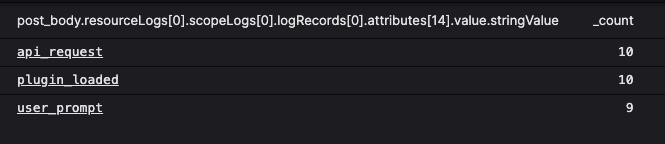
Now, let’s get back to the analysis of what this user was up to. Note that the host requested by the client contained the string claude-code-otel-collector, the user_agent contained OTel-OTLP-Exporter, and we saw all that JSON-formatted data in the post_body. These were solid clues that this was an OpenTelemetry stream that was being sent to a system in AWS. So we delved deeper to see what else we could find in the telemetry, as we hoped that there might be something in there to tell us what the objective was.

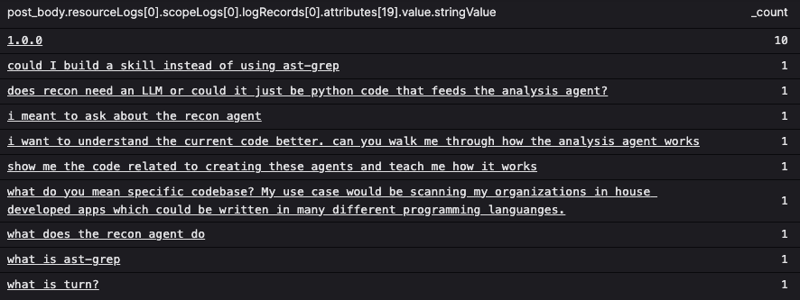
Hmm, user_prompt might be interesting.

Another side note: Corelight enriches all of the logs to include the name of the network segment (usually a training classroom when we’re hunting at Black Hat) that the user is on.
And we’re back. So, was this user in a classroom at Black Hat, and if so, which one?

Ah, yes, that made sense. Just look at one of the prompts: “what do you mean specific codebase? My use case would be scanning my organizations in house developed apps which could be written in many different programming languages."
That definitely looked like it could be related to a conference training session called “Building Real-World Agents for Application Security.” The telemetry also included the name of the tool, so we knew the user was using Claude Cowork to learn how to build AI agents that would analyze the source code of in-house applications to look for security “opportunities for improvement” (read: vulnerabilities). From the context, we were guessing that maybe the user (but more likely the organization they work for) had configured Claude to forward OTel to a centralized repository, possibly for introspection, probably for governance. However, the HTTP endpoint they chose was just that: HTTP, not HTTPS, so lots of sensitive information was being revealed in cleartext, including the user’s email address (which could be linked back to their name, company, and position with one search on LinkedIn), prompts and LLM responses, and the token cost of transactions. This endpoint would expose some attack surface, and therefore should be remediated.
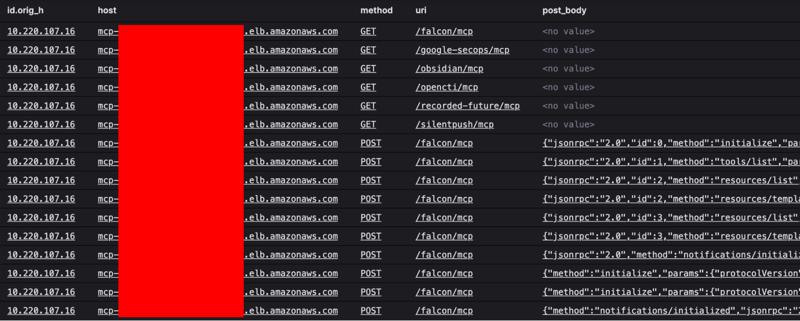
During our hunts, we also found another AI-adjacent “oopsie” that could bring an organization to its knees (or to its demise). In some of the conference HTTP traffic, we noticed calls to a service where the host value started with “MCP” and the uris contained “MCP” as well. We assumed that this might be a reference to Model Context Protocol, a common way to expose a set of tools to one or more chat agents so that they can use those tools to perform tasks on behalf of a user.

From some of the uri values, we were inferring that the MCP was offering access to things like CrowdStrike Falcon (EDR), Okta (IdP), Google SecOps (SIEM), and some threat intelligence providers, all of which would be things typically used by an InfoSec team in their day-to-day work, which makes sense since Black Hat is an InfoSec-focused event.
Unfortunately, those HTTP requests also exposed a Bearer API token:

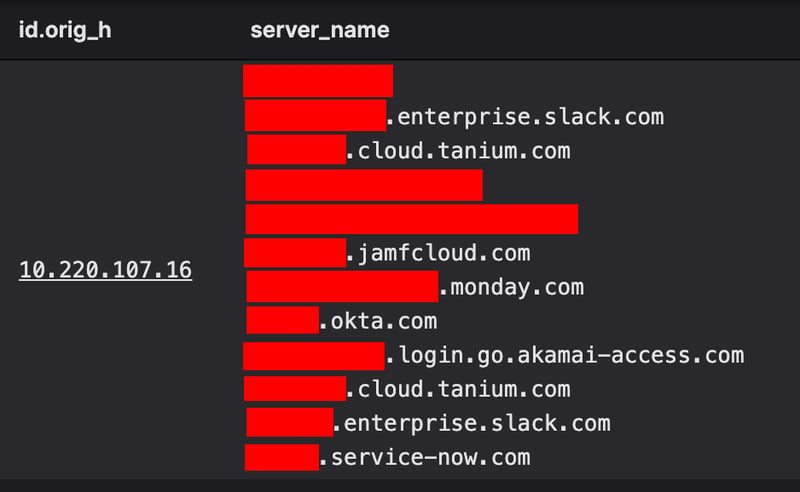
When we in the Black Hat NOC discover something unsecured like this, we always quietly hope it is just a demo, lab, or experimental system of low value. However, due to the nature of the tooling attached to the MCP, the fact that only a couple of devices on the network were interacting with it, and the fact that those devices were also reaching out to several vanity domains for common productivity tools that all had references to one well-known corporation, we suspected that this might actually be a production system.

I’ve redacted those domains, for privacy’s sake (I’m not here to shame anyone in particular since we’re all capable of making mistakes) but I assure you that every one of those domains had a reference to one specific Fortune 500 company. I’d wager you’ve heard of them.
So, we did what we in the NOC do: we cross-referenced class registration records, located the individual, and made contact with them. When the NOC representative showed them the evidence of what we saw, they immediately registered what we already knew: this was serious, and they ducked out of class to start the incident response process with their larger team, because they knew that they needed to:
- Make the service inaccessible from the internet
- Force the usage of TLS for connections
- Invalidate the API token(s) that had been exposed
- Perform a root cause analysis to determine how this mistake occurred
So, why is this so serious?
Agents connecting to the MCP server had read and write access to all of the tooling exposed. Anyone else who had gained access to the MCP could do a lot of grave things. Let’s pontificate what might an attacker want to do with some of these:
- Okta: disable user accounts to cause chaos or inhibit administrators; change the email address on an account and issue a password reset; disable multi-factor authentication (MFA) for an account; change group memberships of an account that the attacker has control of; create a new, innocuous-looking administrative account
- Google SecOps: review incidents related to attacker behavior and close them out with convincing notes stating it was a false positive to hinder incident response
- CrowdStrike Falcon: switch endpoint security posture to detection-only mode, to allow for attacker code to be run; use Falcon Real Time Response (RTR) to run commands on enterprise endpoints (maybe even deploy a little light ransomware), locate security and IT staff (via Okta, perhaps), then place their endpoints in “isolation” mode to hinder their response capabilities for an incident
As you can see, this could have gone very poorly for the organization if someone else with malicious intent intercepted the network traffic and gained access to the MCP! The good news is that we in the Black Hat NOC caught it, and brought it to the user’s attention so that it could be taken care of.
Lessons:
- Just like everything else, AI solutions need to be secured properly to reduce risk/harm to organizations
- The safest way to know that your traffic is secure from eavesdropping (and to detect if it’s not) is to sniff your own network traffic and look for signs of mistakes or misconfigurations
Conclusion
Listen, we need to talk. I know you’ve got a network. Don’t be ashamed, we’ve all got one! But it’s time you and I had the talk about hygiene. I know it’s tempting to want to continue to live like it’s the ‘90s and/or early 2000s. The music was great and nobody expected you or anyone else to care about whether network traffic was encrypted or authenticated. But, let’s be real: it’s the 2020s, and that just doesn’t fly anymore. Growing up means putting on deodorant before you leave the house, and it means taking responsibility for the ways in which your network traffic might be exposing you. The good news is that with something like Corelight’s Open NDR Platform you can get all of the visibility you need to understand what’s in your network traffic and where some of the risks lie. If you want to see what might be hiding in your network traffic, reach out. We can help! Deodorant sold separately. Packets not included. Some interaction with your procurement team required.
In the meantime, I recommend checking out our highly sought-after Threat Hunting Guide to fuel your hunts. And if you liked this blog, check out our other Black Hat posts for more play-by-play findings.