malware
Hunt of the Month: Detecting AsyncRAT Malware Over HTTPS
Hunt of the Month: Detecting AsyncRAT Malware Over HTTPS
BitRAT is a potent and versatile Remote Access Trojan (RAT) commonly sold on underground forums. Its popularity stems from a robust feature set and an emphasis on stealth, allowing it to evade detection by hiding command-and-control (C2) communications over seemingly benign protocols. This makes traditional detection methods more challenging. By examining the subtle artifacts it leaves behind, even in encrypted traffic, defenders can expose these elusive threats.
This article explains how Corelight detects BitRAT's C2 activity by focusing on a common misconfiguration: its use of a default SSL certificate.
Malware analysis sandboxes like ANY.RUN provide invaluable insights into attacker techniques. As seen in the PCAPs below, a recurring observation in analyses of BitRAT samples is the malware's reliance on HTTPS for C2 communications. While the traffic payload is encrypted, the SSL certificate used by the C2 server can often contain plaintext strings that betray its identity.
Attackers often use simple, default certificates generated by the malware itself, which are not trusted by legitimate certificate authorities. By analyzing several BitRAT samples, security researchers at Corelight Labs found that these certificates contain a distinct string in their subject and issuer fields. The presence of these specific strings allows us to identify the malicious server, even with encrypted communications.
This technique is a core component of the MITRE ATT&CK® tactic for Application Layer Protocol (T1071), which adversaries use to communicate over standard protocols.
Some ANY.RUN samples we examined were:
By analyzing the x509.log, which records comprehensive details about authentication certificates, we observed that the malware's C2 server frequently uses a default SSL certificate. This certificate explicitly identifies the server as a BitRAT malware C2, making its malicious purpose evident. In the example x509.log below, generated from the PCAP you can download in the first ANY.RUN link above, you can see the server subject and issuer contain the string "CN=BitRAT". This lack of OPSEC is a critical error on the part of the attackers. The commoditized nature of the BitRAT framework means that attackers are often simply using the code without understanding its inner workings or taking steps to customize it, creating a high-fidelity detection opportunity.
After examining multiple samples on ANY.RUN and reviewing the referenced source code, we identified the following two strings commonly associated with the default SSL certificates used by BitRAT's C2 servers:
We can leverage the use of the default SSL certificate on the C2 server as a key detection point to uncover BitRAT infections, despite the challenge of HTTPS-encrypted traffic.
If you're a Zeek user, you can quickly search your historical logs for evidence of BitRAT by examining the x509.log and ssl.log files. The x509.log captures detailed information about every certificate observed on the network.
A simple way to detect suspicious certificate traffic is to look for connections where the certificate subject or issuer contains a known BitRAT-related string. The following command searches compressed Zeek logs for certificates containing the string "bitrat".
Once you find a match in the x509.logs, you can match the x509 certificate fingerprint to the fingerprints listed in the SSL logs to find the connection specifics. In the example PCAP above, we saw that the fingerprint is "b9140c664..", so we can search for this in the ssl.log as shown below:
The log above tells us that the connection was 192.168.100.9:49834 ⟹ 45.134.225.90:7100
If your logs are stored in a SIEM like CrowdStrike's LogScale, you can perform the same analysis with a simple query that looks for x509 events where the certificate subject or issuer contains one of the known strings:
The following screenshot shows the Zeek logs identified by this SIEM query:
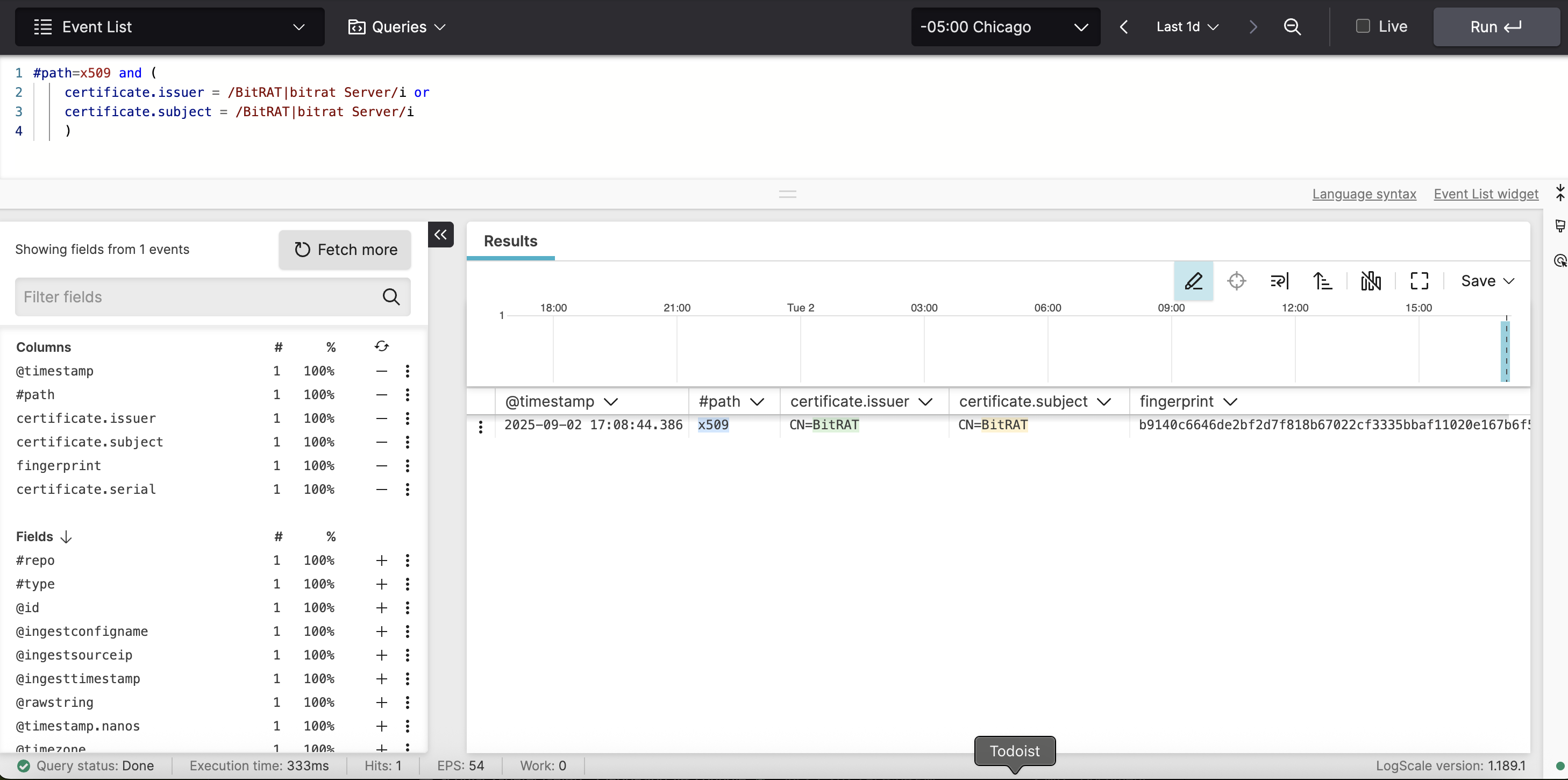
This query first filters for certificate logs, then checks for the BitRAT-related strings in a case-insensitive manner, highlighting the certificates that match our detection pattern.
For real-time detection, a custom Zeek script can monitor SSL/TLS traffic and generate a notice when a potential BitRAT C2 is identified. The following script uses the ssl_established event to inspect the SSL certificate and alert on any traffic that matches the predefined regular expression.
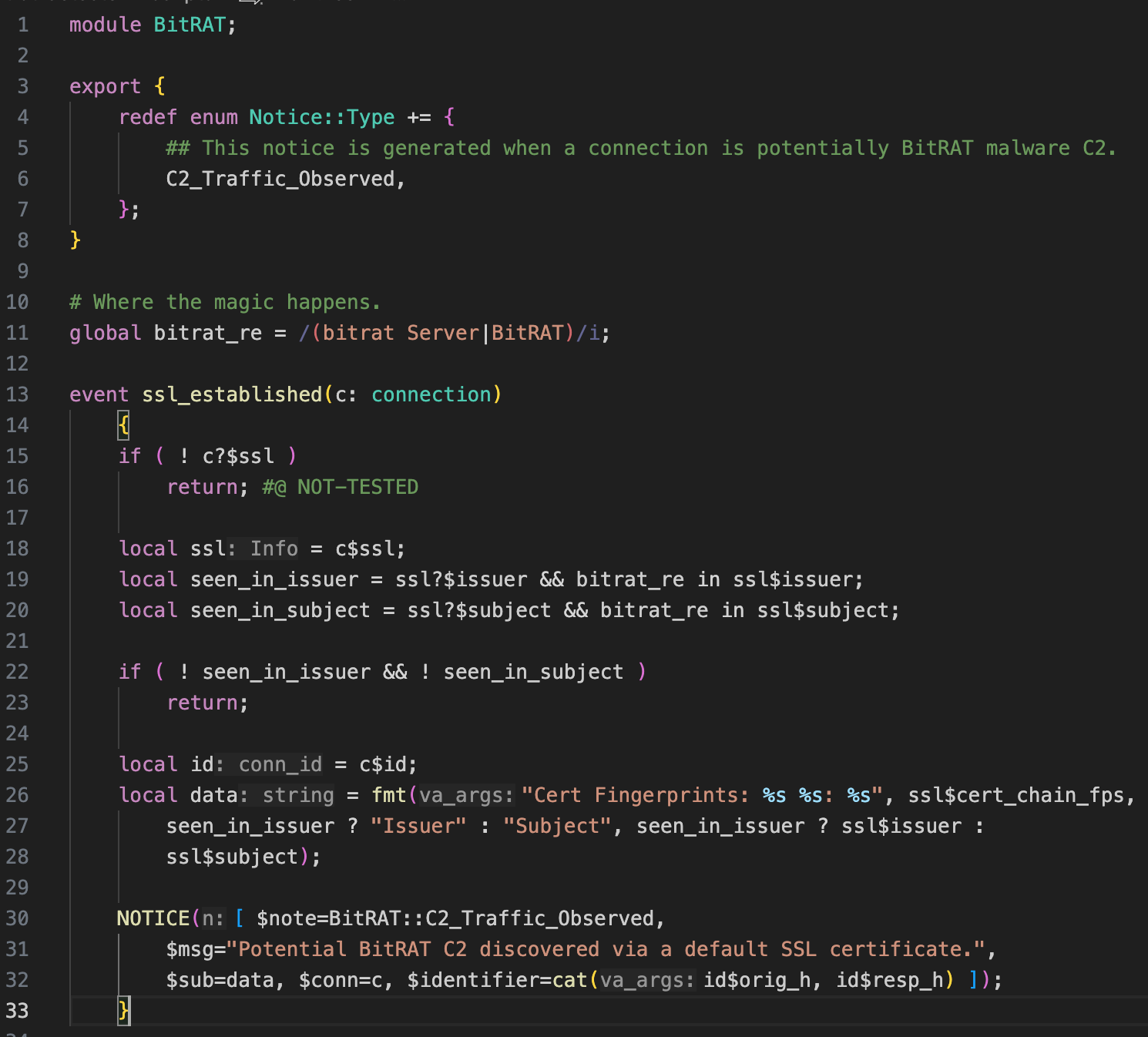
The code above handles the ssl_established event. You can find the regular expression used to match the SSL certificate issuer or subject on line 11:
If this regular expression is found in the SSL certificate issuer (line 19) or subject (line 20), Zeek will generate the appropriate notice on line 30. Putting this all together and running it on our example PCAP generates the following notice.log:
You can see that the regular expression was found in the SSL certificate's issuer for this PCAP.
You can also use Suricata signatures to detect this type of activity. The following rule detects suspicious strings in the TLS certificate's subject and issuer fields.
This rule is a great starting point for detecting BitRAT, as it's simple yet effective. It instructs Suricata to inspect both the subject and issuer fields of the TLS certificate for the string "CN=BitRAT". The nocase modifier makes the search case-insensitive.
When attackers employ commoditized frameworks without understanding their elements, they may fail to customize the components, resulting in the use of a default SSL certificate. This lack of customization is a key indicator. The server literally announces itself as a component of the BitRAT malware framework, a behavior security teams can leverage for high-fidelity detection.
For more insights into threat detection and mitigation, we recommend checking out Corelight's resources and the broader open-source security community.